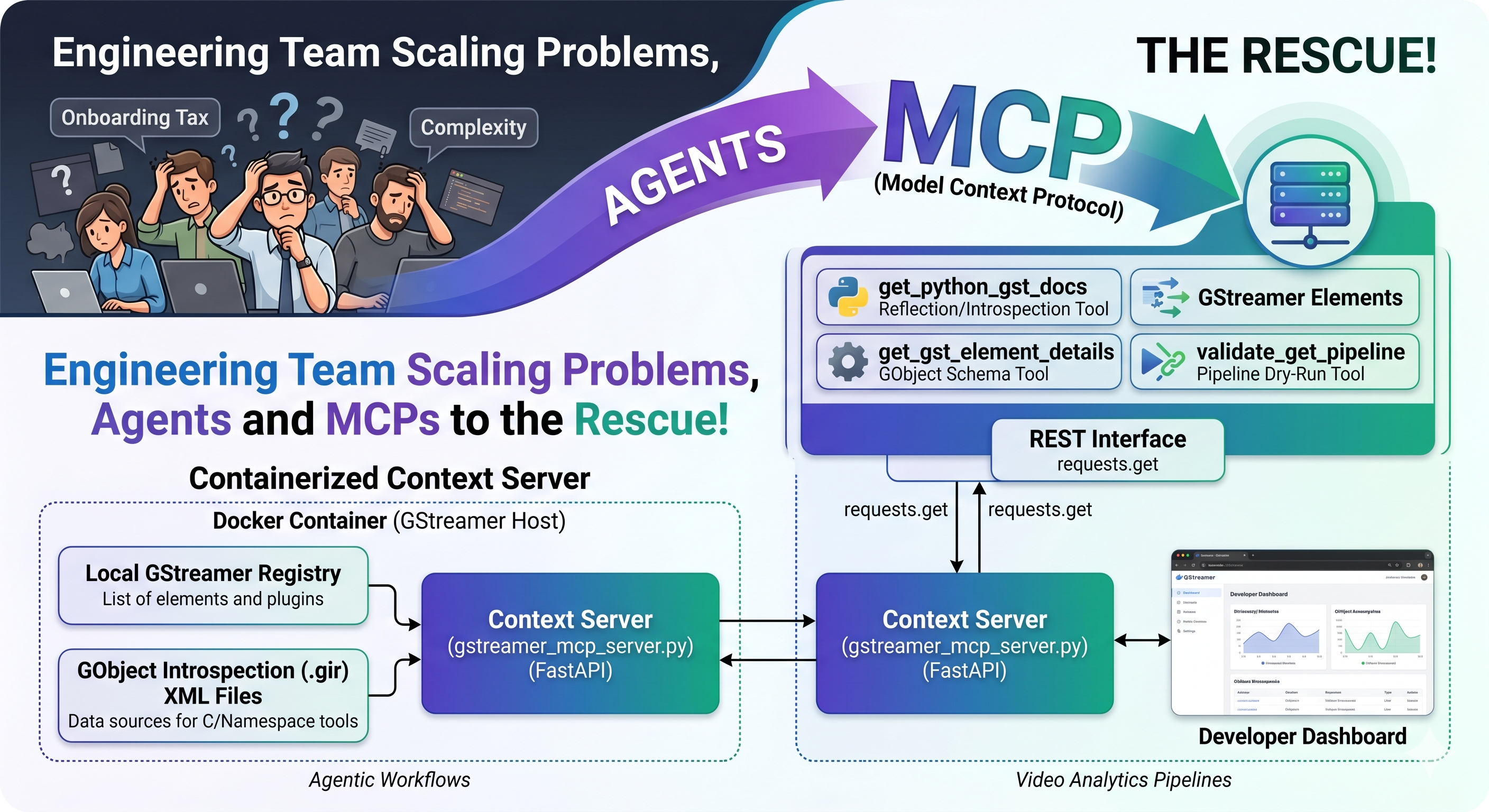
In this article I will discuss what challenges engineering managers typically face when trying to rapidly grow size of an engineering team that uses complex tooling and how this can be partially alleviated with the current agentic development tools and approaches, such as Model Context Protocols (MCPs). The example I have chosen here is related to developing complex image processing pipelines with GStreamer, but the same principles apply to other similar uses cases as well.
The reason for choosing GStreamer as the technology for this article is due to the following:
- GStreamer is probably the largest media framework in existence with a lot of legacy, making the learning curve particularly steep.
- Due to the modular structure of GStreamer, one needs to query if a particular element has been installed.
- Introspection of the elements can produce a lot of information that will start filling the context window quickly, especially if the processing pipeline is complex.
Expanding Engineering Teams and Complex Tooling
Expanding engineering teams that implement complex video analytics pipelines based on bleeding edge technology is challenging due to a number of reasons. In the following I highlight some of the problems
- Quickly evolving field. The engineers need to keep track of what is happening in the field so that they can create competitive solutions. In a field that is developing at an ever faster pace, this task itself is complex.
- Solution complexity. The engineering team needs to master several technologies so that the solutions are both robust and efficient. Poor efficiency typically translates into increased hardware costs for the end client.
- On-boarding tax. New engineers joining the team need to learn the code base and the tools and frameworks being used. Counterintuitively, hiring more team members typically causes temporary dip in output, especially if the tooling has a steep learning curve, as seasoned engineers must dedicate time to on-boarding.
Regarding the solution complexity and on-boarding tax, agentic development tools can help by allowing the team to overcome the learning curve faster, shortening the timeline to increased team output.
Context Optimization and Model Context Protocol (MCP)
In my LinkedIn article called Do Large Language Models Dream I explained that every LLM response is a probabilistic reconstruction of compressed knowledge and how context injection via RAG, MCP or similar technologies can steer the LLM in the desired direction. The Model Context Protocol (MCP) is an open standard and open-source framework introduced by Anthropic that allows LLMs to access external tools, systems, and data sources. Most harnesses support MCPs and integrating these into the agentic flow is typically as simple as adding the MCP in the agent's configuration file.
MCP is not the only technology that allows agents to use tools to extend what agents can do. For example, LangChain's Tools provide similar functionality, allowing agents to execute code, access databases, and so on. The difference between LangChain's Tools and MCP is that in the case of LangChain the tools tend to be more application oriented whereas in the case of an MCP server the idea is that the server can be exposed to all the required agents. Even though there is some overlap between the functionalities what LangChain and MCP offer, I see them more as supplementing each other than competing with each other.
However, the topic of this article is not the pros and cons of LangChain and MCP, but a concrete use case of an MCP that exposes some of the internals of the GStreamer framework for harnesses.
GStreamer
Released in 2001 and written in C, GStreamer is arguably the largest media framework in existence. Its modular architecture relies on chaining together processing elements to form complex multimedia pipelines. This modularity makes it a perfect candidate for building efficient, high performance video analytics workflows. For example, NVIDIA's DeepStream and Intel's Deep Learning Streamer are built on top of GStreamer. However, all this functionality comes at a steep cost. The sheer scale of the framework, combined with paradigms like GObject dynamic introspection, makes the learning curve very steep for new developers.
Coding agents typically handle relatively well basic GStreamer related development tasks, but depending on the programming language being used (GStreamer has bindings for Go, Python, Rust, Vala, C++, Perl etc.), sometimes the agent cannot extract/find the correct information, with the tools it has at its disposal. For example, due to the modular structure, some of the elements might not be available in the local GStreamer installation. If the approach taken by the agent does not work, due to any number of reasons, the agent might end up downloading and analyzing GStreamer's source code, and iteratively trying different approaches. There is nothing wrong with this approach per se, it's pretty much the same approach taken by a human developer. However, this can lead to the following problems
- Context window. The context window starts filling up which after certain point can have a negative impact on the agents reasoning skills.
- Token waste. This can waste a lot of tokens as the agent needs to test out different combinations iteratively.
This is where a GStreamer Model Context Protocol (MCP) server comes handy by exposing the information that the agent requires as context.
GStreamer MCP Server for Agentic Development
The idea of the GStreamer MCP server is to provide information of different elements available, language bindings, types of arguments, etc. so that the agent has all the information that it needs for the task at a hand. The tools exposed by the server provide the information that the agent needs, in Markdown format, without flooding the context window. Architecturally the GStreamer MCP server has been implemented so that it contains the following components
- Context server. The context server extracts information from the local GStreamer installation.
- MCP server. The MCP server exposes the tools to the harness.
The reason for choosing this architecture is that we want to be able to use the MCP server in a configuration where the server runs in the host together with the harness and the context server runs inside a Docker container where the GStreamer is installed. This architecture gives us the possibility of testing different GStreamer versions effortlessly. Figure 1 shows the system architecture.
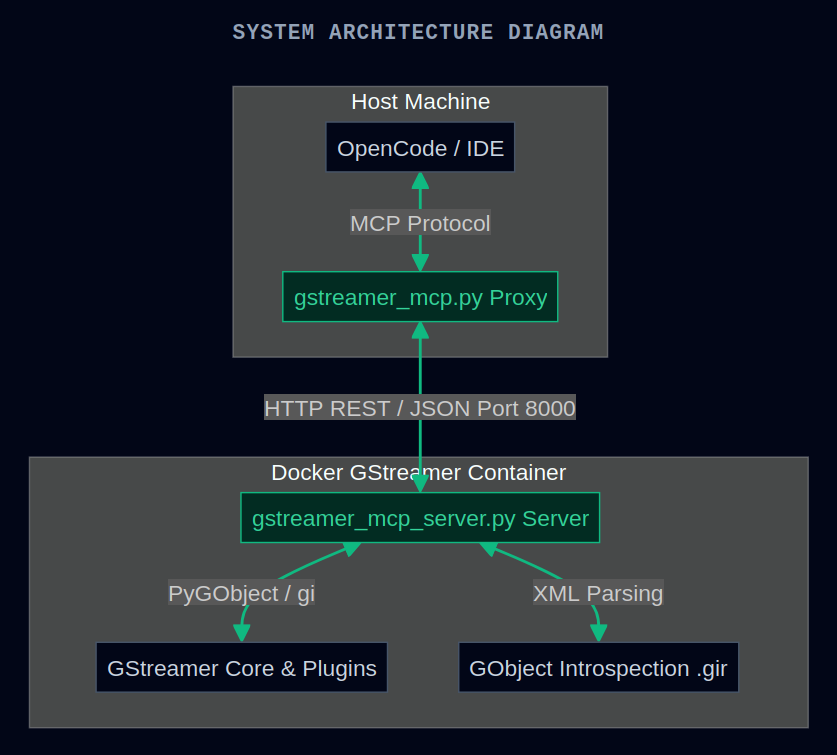
As can be seen from Figure 1, OpenCode (the harness) communicates with the GStreamer MCP server using the MCP protocol. The MCP server (gstreamer_mcp.py) communicates with the context server (gstreamer_mcp_server.py) using a REST-interface.
To simplify testing and deployment, the system can be launched using the following Docker Compose file:
services:
  gstreamer-docs-cpu:
    build:
      context: .
      dockerfile: Dockerfile-gstreamer-1.28http://localhost:8080/blog
    image: gstreamer-1.28-mcp
    container_name: gstreamer-mcp-cpu
    working_dir: /workspace
    ports:
      - "127.0.0.1:8000:8000"
    volumes:
      - ../:/workspace
    environment:
      - PYTHONPATH=/usr/local/lib/python3/dist-packages:/usr/local/lib/python3.12/site-packages
      - GI_TYPELIB_PATH=/usr/local/lib/x86_64-linux-gnu/girepository-1.0
      - LD_LIBRARY_PATH=/usr/local/lib/x86_64-linux-gnu
      - GST_PLUGIN_PATH=/usr/local/lib/x86_64-linux-gnu/gstreamer-1.0
    # Override default CMD to run the FastAPI app directly with uvicorn
    command: uvicorn docker.gstreamer_mcp_server:app --host 0.0.0.0 --port 8000

  gstreamer-docs-cuda:
    build:
      context: .
      dockerfile: Dockerfile-gstreamer-1.28-cuda
    image: gstreamer-1.28-cuda-mcp
    container_name: gstreamer-mcp-cuda
    working_dir: /workspace
    ports:
      - "127.0.0.1:8000:8000"
    volumes:
      - ../:/workspace
    environment:
      - PYTHONPATH=/usr/local/lib/python3/dist-packages:/usr/local/lib/python3.12/site-packages
      - GI_TYPELIB_PATH=/usr/local/lib/x86_64-linux-gnu/girepository-1.0
      - LD_LIBRARY_PATH=/usr/local/lib/x86_64-linux-gnu
      - GST_PLUGIN_PATH=/usr/local/lib/x86_64-linux-gnu/gstreamer-1.0
    # Enable NVIDIA GPUS
    deploy:
      resources:
        reservations:
          devices:
            - driver: nvidia
              count: all
              capabilities: [gpu, compute, video, utility, graphics]
    # Override default CMD to run the FastAPI app directly with uvicorn
    command: uvicorn docker.gstreamer_mcp_server:app --host 0.0.0.0 --port 8000
Context Server
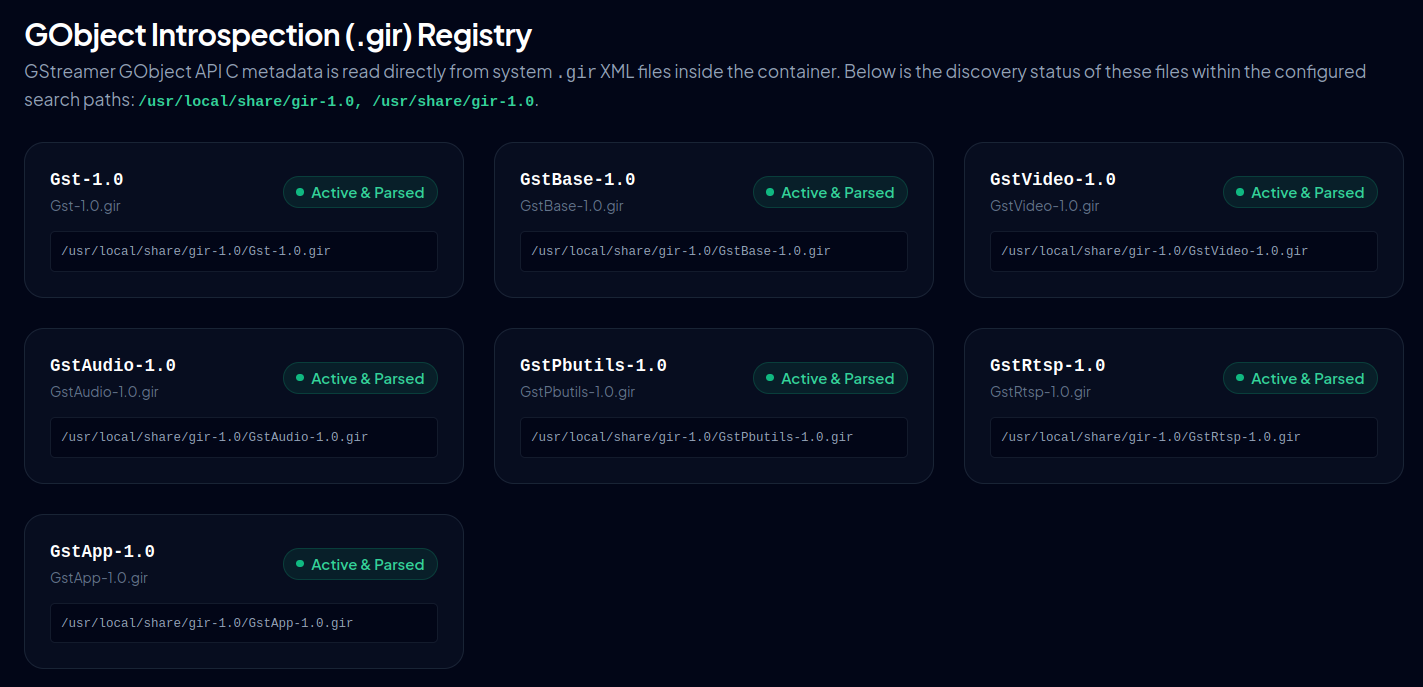
The context server runs inside the Docker container, providing the information requested by the harness via the Model Context Protocol (MCP). Implemented using the FastAPI Python framework, the context server also features a dashboard that allows developers to interact with the server directly. Figure 2 shows all the different .gir files that have been discovered.
Agentic Tools
So, what are the actual tools that are exposed by the GStreamer MCP server? Following is a list of things that are exposed in the current implementation:
- Querying Introspection Bindings using PyGObject
- The agent can query Python bindings regarding function arguments, docstrings, argument types, and class hierarchies.
- The context server uses Python reflection (querying from a runtime object)and PyGObject introspection.
- Querying C Signatures
- The agent can query C function signatures, structs, pointers, and virtual methods.
- This is based on parsing the .gir (XML) files.
- Discovering GObject Namespaces & Classes
- The agent can discover which GObject namespaces (e.g., GstVideo, GstAudio, GLib) are installed and list all queryable GObject class paths available inside the container.
- This parses .gir XML files on-demand with lazy memory caching.
- Searching Registered GStreamer Elements
- The agent can query which elements are actually available in the live containerized GStreamer registry.
- Supports searching by keyword and filtering by semantic class/classification (e.g., Decoder, Source, Sink).
- Inspecting GStreamer Element Details
- The agent can query detailed, structured schemas of a given element (typed properties, defaults, readable/writable flags, pad templates, and mime caps).
- To save context space, the raw gst-inspect-1.0 CLI specs are omitted by default and can be optionally loaded on-demand with spacing-minification applied.
- Dry-running a Pipeline
- The agent can easily test if a given pipeline string manages to successfully negotiate caps, transition states, and link pads.
- Captures and reports precise caps-negotiation warnings, state errors, and link failures in an automated loop.
The aim is to give the agent the required tools for discovering what elements are available, what do these do and most importantly, how can these be connected to create a pipeline. Output from the context server is in JSON that is parsed by the MCP server into Markdown or plain-text strings. The agent does not have to double guess what elements are available in GStreamer installed in the Docker container since this can directly be queried. Also, function signatures for C and Python are available (easy to expand for other languages), along with type information, further giving more context to the agent.
Empirical Testing
Empirical testing showed that using the GStreamer MCP server with OpenCode, and paired with Gemini Flash 3.5 as the LLM, improved development efficiency. The agent understood bettwe how to implement the required pipelines and identify valid elements, eliminating the trial-and-error iterations typically seen without context optimization.
While this initial implementation is a functional prototype rather than a fully fledged product, in exposes enough of GStreamer's internals to provide enough context for the agents in most cases. Due to its modular design, new capabilities can be added with minimum effort.
The code is available at https://github.com/JarnoRalli/gstreamer-examples/tree/main/docker along with the instructions related to how to set it up.
Conclusion
Implementing tools using Model Context Protocol (MCP) can be used for injecting context into agentic development workflows, vastly improving efficiency of such tools. This in turns helps when expanding engineering teams that need to deal with complex frameworks that have steep learning curves.